Save 25%Today only. Once it’s gone, it’s gone — grab yours before it sells out.
One-time purchase
No commitment, buy once.
£36.98
One-time price
Save
Most popular choice
Please choose a delivery frequency before adding to basket.
✓ Save on every order✓ Change or cancel anytime✓ Skip or delay deliveries£33.28£36.98
Save £3.70
Couldn't load pickup availability
Next Day Delivery availableOrder by 2pmMon–Fri
Order by 2pm (Mon–Fri) for next working day delivery.
Orders placed after 2pm or on weekends are processed the next working day.
Description
Prescription Diet c/d Multicare Chicken Flavor Dry Dog Food is specially formulated by nutritionists & veterinarians to help manage the risk of oxalate & struvite stones in dogs. This dry food has irresistible chicken flavor that dogs love.
Hill's Prescription Diet c/d Multicare Urinary Care Chicken Flavor Dry Dog Food is specially formulated by Hill's nutritionists and veterinarians to support a dog's urinary health
Enriched with antioxidants, potassium citrate and omega-3 fatty acids
Formulated to help dissolve struvite stones
Controlled levels of magnesium, calcium & phosphorus help reduce the building blocks of struvite and calcium oxalate stones
Recommended for lifelong feeding of adult pets
Hill's Prescription Diet is the #1 US Vet Recommended therapeutic pet food — consult with your vet to make sure
Prescription Diet c/d Multicare is the right food for your dog history
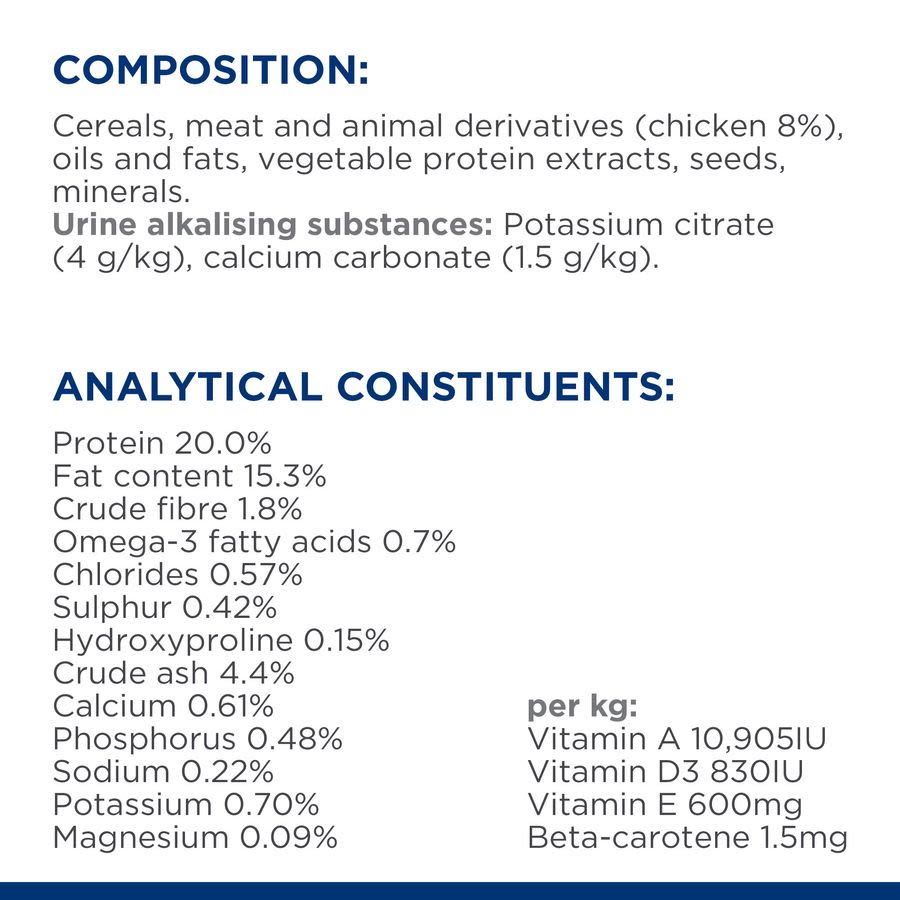
Ingredients
Additional Information
SKU:I9683412Copied!
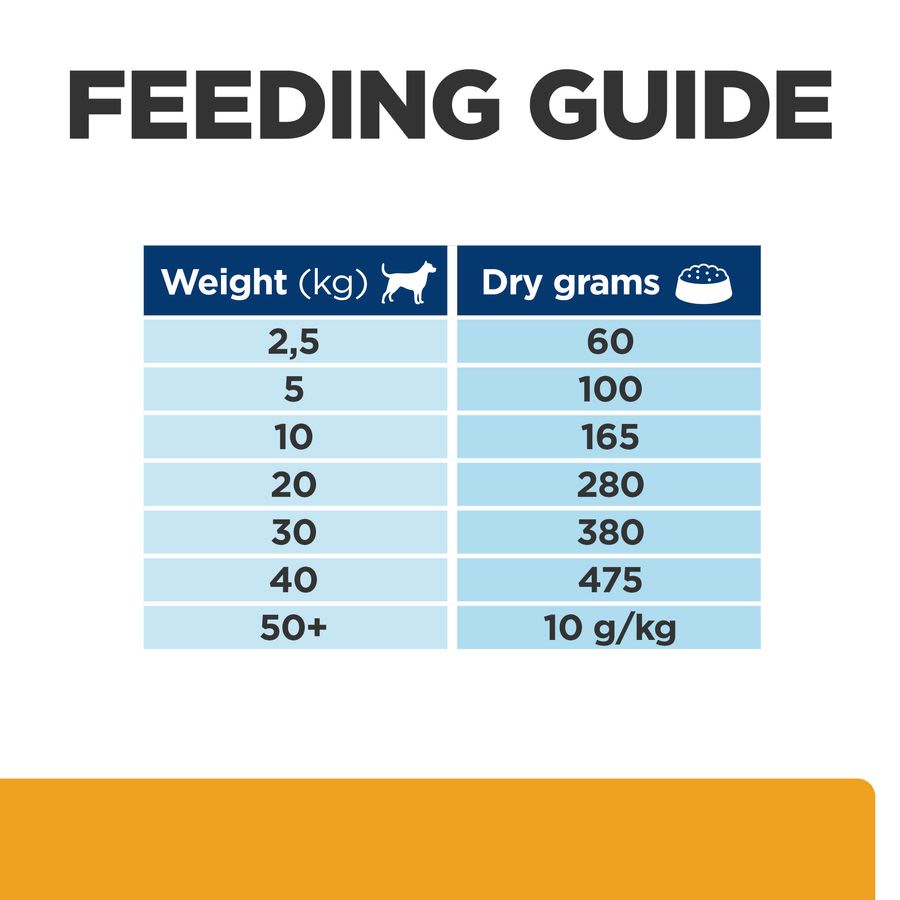
Feeding Guide
Hill's Prescription Diet c/d Multicare Urinary Care Dry Dog Food - Chicken
Purchase options:
Please choose a delivery frequency before adding to basket.
✓ Save on every order✓ Change or cancel anytime✓ Skip or delay deliveries
Pet Supermarket operated by Fetch! Retail Limited Address - Unit 1, Paramount House Gelderd Road, Birstall, Batley, England, WF17 9QD
Choosing a selection results in a full page refresh.
Opens in a new window.
PayPal Pay Later Messaging
Step 1: Choose message placement
Click the button below and then hover over your page to select a placement.
Step 2: Paste and save
You have copied the placement for the Product Page.
Go back to the App Embeds section, and in the Paypal Advanced Settings, paste the copied value into the
Product Page field and click the 'Save' button in the top right corner.